

Once you move beyond basic Claude conversations, you’ll start coming across three terms: Projects, Skills, and Connectors.
- The Difference at a Glance
- Projects: Keep Related Work and Context Together
- Skills: Give Claude a Repeatable Process
- Connectors: Let Claude Work With Other Apps and Data
- Projects vs. Skills
- Skills vs. Connectors
- How Projects, Skills, and Connectors Work Together
- Which One Should You Use?
- Practical Takeaway
- FAQ
They can all make Claude more useful, but they solve different problems. Knowing which one you need can save you from setting up something more complicated than the task requires.
The simplest distinction is:
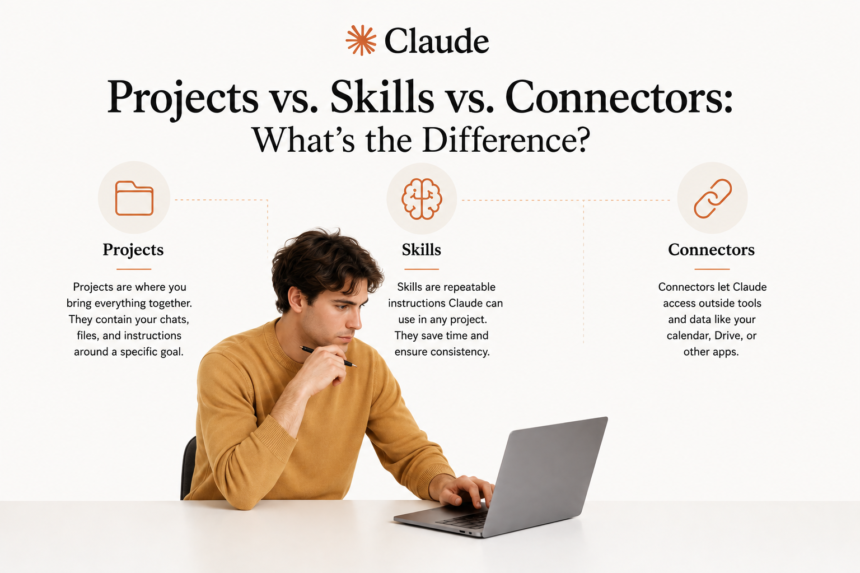
Projects store context. Skills provide a repeatable way of doing something. Connectors give Claude access to external tools and information.
Here’s how each one works. Pasted text
The Difference at a Glance
| If your problem is… | Use |
|---|---|
| “I keep giving Claude the same background information whenever I work on this client.” | Project |
| “I want Claude to handle this type of task the same way every time.” | Skill |
| “Claude needs information from my files, email, calendar, or another service.” | Connector |
The easiest way to remember it is:
Repeated context → Project
Repeated process → Skill
External information or tools → Connector
Projects: Keep Related Work and Context Together
A Project is a dedicated workspace for an ongoing area of work.
You might create one for:
- a client
- a business
- a product
- a research topic
- a department
- a long-term project
Inside a Project, you can add files, background information, and instructions that Claude can use across conversations within that workspace.
For example, imagine you regularly use Claude for one client. Instead of explaining the client’s audience, tone of voice, products, and requirements every time, you could create a Project and add the relevant information to its knowledge base.
You might include:
- brand guidelines
- product information
- contracts
- campaign documents
- writing guidelines
- reference material
You can also add Project instructions telling Claude how you want it to approach work in that space. Then, when you start a new conversation within the Project, Claude can use that saved Project knowledge as context.
One important distinction: separate chats inside a Project do not automatically share everything said in previous chats. If information needs to remain available across the Project, add it to the Project knowledge or instructions.
Use a Project when the same background information applies to many different tasks over time.
Skills: Give Claude a Repeatable Process
A Skill gives Claude specialised instructions for handling a particular type of task. Think of it as a reusable process or playbook.
Instead of repeatedly explaining:
Use these sections, follow this structure, calculate these figures, use this tone, and format the finished report this way.
you can package those requirements into a Skill.
For example, you could create a Skill for a monthly performance report that specifies:
- which sections to include
- how results should be organised
- which calculations to perform
- the level of detail to use
- how the final report should be formatted
When Claude recognises a task that matches the Skill, it can load those instructions and apply them.
Skills can contain more than written instructions. They can also include reference material and, for more advanced workflows, scripts that Claude can run. Anthropic also provides Skills for certain tasks, while individuals and organisations can create their own.
The main distinction from a Project is that a Skill is centred on how a task should be done, rather than the background surrounding one particular client or area of work.
Use a Skill when you want a specific task or workflow completed consistently.
Connectors: Let Claude Work With Other Apps and Data
A Connector gives Claude access to an external service or source of information. Instead of manually finding information and pasting it into the conversation, Claude can access supported tools directly.
For example, you might connect:
- Google Drive
- Gmail
- Google Calendar
- other supported workplace tools and services
If Google Drive is connected, you could ask Claude to find a report stored there and use it as part of a task. If your calendar is connected, you could ask Claude to work with your schedule. If Gmail is connected, Claude can use relevant email information without requiring you to copy an entire thread into the conversation first.
What Claude can do depends on the Connector and the permissions available. Some may provide access to information, while others can support actions within the connected service.
The Model Context Protocol (MCP) is the open standard that allows AI systems such as Claude to connect with external tools and data sources. You don’t need to understand the technical side of MCP to use everyday Connectors.
The practical distinction is much simpler: a Connector gives Claude access to something that lives outside the conversation.
As with any app connection, review the permissions before granting access so you understand what information or actions are available.
Use a Connector when Claude needs information or tools that exist somewhere other than the chat itself.
Projects vs. Skills
Projects and Skills are easy to confuse because both reduce repetition. The difference is what you are repeating.
Imagine you manage marketing for a client.
A Project might contain:
- the client’s brand guidelines
- target audience
- product information
- previous campaigns
- general instructions for working with that client
That information applies to many different tasks.
A Skill, on the other hand, might explain exactly how to create the client’s monthly performance report.
The Project tells Claude:
“Here is what you need to know about this client.”
The Skill tells Claude:
“Here is how to complete this particular task.”
That is the key difference: a Project carries the background; a Skill carries the method.
Skills vs. Connectors
Skills and Connectors can also work closely together, but they provide different things.
A Skill gives Claude a process. A Connector gives Claude access.
For example, you might have a Skill that tells Claude how to prepare your monthly marketing report, but Claude still needs the current month’s data.
A Connector could give it access to the service where that information is stored.
The Skill explains what to do with the information. The Connector helps Claude reach it.
How Projects, Skills, and Connectors Work Together
You don’t necessarily have to choose only one. A more advanced workflow may use all three.
Imagine a marketing agency managing a long-term client account. The agency could use:
- a Project containing the client’s brand guidelines, audience information, campaign history, and other background
- a Skill defining how the monthly performance report should be created
- a Connector giving Claude access to the files or data needed for the latest report
Each serves a different purpose.
The Project provides the background. The Skill provides the process. The Connector provides access to the information or tools needed to complete the work.
Together, they reduce the amount of context, instruction, and information you need to provide manually each time. Pasted text
Which One Should You Use?
Before setting anything up, identify what is making the task repetitive or difficult.
Am I repeatedly explaining the same background?
Create a Project.
Am I repeatedly explaining how a particular task should be completed?
Consider a Skill.
Am I repeatedly copying information from another app into Claude?
Look for a Connector.
You may eventually need more than one, but you don’t need to start there. Choose the feature that solves the problem you already have.
Practical Takeaway
Projects, Skills, and Connectors all help Claude work with more than a single isolated prompt, but in different ways.
Projects keep relevant context together.
Skills give Claude repeatable instructions and workflows.
Connectors give Claude access to external tools and information.
If you remember those three distinctions, deciding which one to use becomes much easier.
Start with the problem you’re trying to remove: repeated background, repeated processes, or repeated manual copying between tools. Then choose the feature that addresses it.
FAQ
Can I use a Skill with a Project?
Yes. They solve different problems and can be used together. A Project can provide background information for a particular area of work, while a Skill provides instructions for completing a specific type of task.
Do Connectors work without Projects or Skills?
Yes. Connectors are useful on their own. You can connect a supported service and use it in a regular Claude conversation without creating a Project or Skill first.
Which one should a beginner set up first?
You don’t need any of them to start using Claude. Begin with standard conversations. A Project is often the most natural next step once you notice yourself repeatedly providing the same background information.
Is MCP something I need to understand to use Connectors?
No. MCP is the underlying standard used to connect AI systems with external tools and information. You can use Connectors without understanding how MCP works technically.
Do Skills require technical knowledge to build?
Not necessarily. A simple Skill can consist mainly of written instructions and reference material. More advanced Skills can also contain scripts and other resources, so technical knowledge may be useful for more complex workflows.
Can I use all three together?
Yes. A Project can provide the background, a Skill can define the process, and a Connector can provide access to the information or tools needed to complete the task.